

Employee Probation Evaluation Form – Free Download (Word & Excel Template)
By Muhammad Faisal | HR Guide
Every new hire starts with hope. They want to prove themselves, and the manager wants to know whether the person will fit the team. The probation period is the bridge between those two feelings, and the employee probation evaluation form is the tool that makes the final decision fair, clear and documented.
Without a proper form, probation decisions are based on mood, memory or personal liking. That leads to confusion, unhappy employees and sometimes legal trouble. With a simple, structured form, the decision rests on facts.
In this guide you will learn what a probation evaluation form is, what it must include, how to fill it step by step, and how to download the free Word and Excel templates from this page.
| In my HR experience, I have seen employees struggle during their probation period simply because they were not given timely feedback or clear expectations. In one situation, an employee had the potential to perform well, but a lack of proper guidance almost resulted in losing a valuable team member. Regular check-ins, constructive feedback and clear communication can make a significant difference. I believe probation should be a period of learning and development, not just a test of performance. |
What Is an Employee Probation Evaluation Form?
An employee probation evaluation form is a written document in which a manager or HR officer reviews a new employee’s work, behavior and attitude during the probation period. At the end, it records one clear decision:
- Confirm the employee as permanent
- Extend the probation for a fixed time
- Terminate the employment as per company policy and applicable law
Probation usually lasts 3 months, though it can be 1 to 6 months depending on the company, the role and the country.
Why Is a Probation Evaluation Form Important?
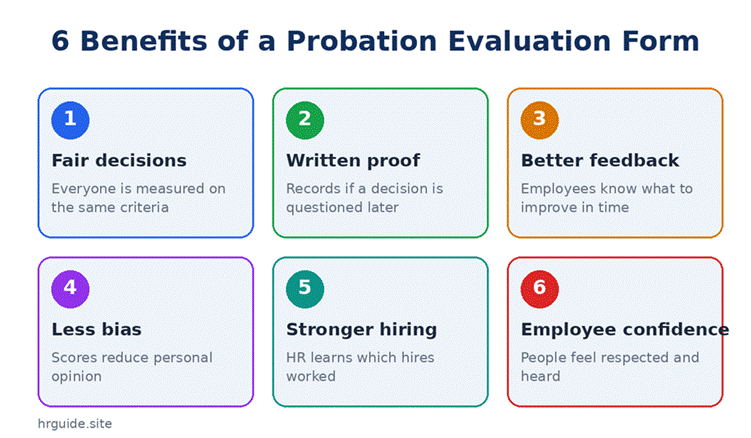
- Fair decisions. Every employee is measured on the same criteria.
- Written proof. If a decision is questioned later, you have records.
- Better feedback. Employees know their strong and weak areas while there is still time to improve.
- Less bias. A scoring system reduces personal opinion.
- Stronger hiring. HR learns which hiring decisions worked and which did not.
- Employee confidence. People feel respected when they are evaluated openly.
What Should a Probation Evaluation Form Include?
A good form is short but complete. Include these sections:
1. Employee information
Name, employee ID, job title, department, date of joining, probation end date, name of the manager.
2. Performance criteria
Use 6 to 8 areas that match the job:
- Quality of work
- Productivity and meeting deadlines
- Job knowledge and learning speed
- Communication
- Teamwork and attitude
- Attendance and punctuality
- Following company policies
- Initiative and problem solving
3. Rating scale
A simple 1 to 5 scale works best:
| Score | Meaning |
| 5 | Outstanding – exceeds expectations |
| 4 | Very good – above expectations |
| 3 | Meets expectations |
| 2 | Needs improvement |
| 1 | Unsatisfactory |
4. Manager comments
One or two lines of specific evidence for each rating, not just a number.
5. Employee self-review (optional but powerful)
The employee writes how they feel they performed. This opens an honest conversation.
6. Final recommendation
Confirm, extend or terminate, with the reason.
7. Signatures and date
Manager, HR and employee signatures. The employee’s signature means they received the review, not necessarily that they agree.
Sample Probation Evaluation Form (Preview)
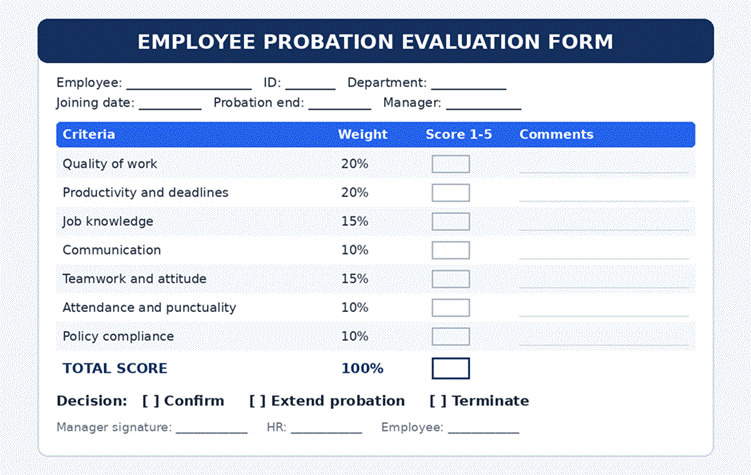
| Criteria | Weight | Score (1–5) | Comments |
| Quality of work | 20% | ||
| Productivity and deadlines | 20% | ||
| Job knowledge | 15% | ||
| Communication | 10% | ||
| Teamwork and attitude | 15% | ||
| Attendance and punctuality | 10% | ||
| Policy compliance | 10% | ||
| Total | 100% |
Decision guide (you can adjust to your policy):
- 4.0 and above: Confirm the employee
- 3.0 to 3.9: Confirm, with development goals
- 2.5 to 2.9: Extend probation with a written improvement plan
- Below 2.5: Review for termination as per policy and law
Step-by-Step: How to Use the Probation Evaluation Form
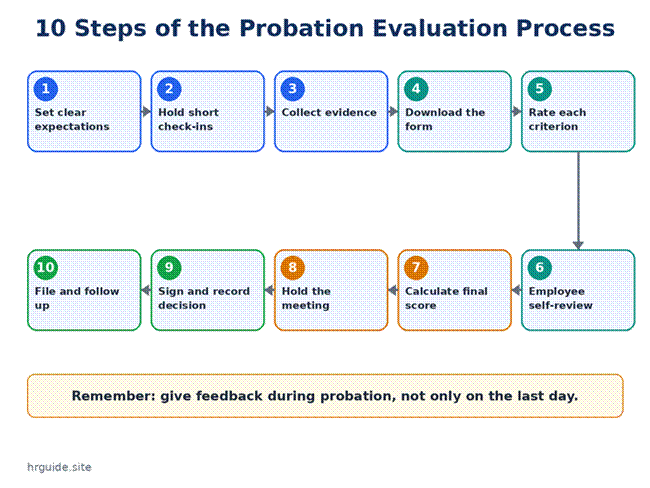
Step 1: Set clear expectations on day one
Give the new employee a short list of goals and the criteria you will use. An employee cannot succeed at a target they have never seen.
Step 2: Hold short check-ins
Meet in week 2, month 1 and month 2. Ten minutes is enough. Note what is going well and what needs work.
Step 3: Collect evidence during the period
Keep simple notes: tasks completed, mistakes, praise from colleagues, attendance. Do not trust memory at the end.
Step 4: Download and prepare the form
Download the Word or Excel template below and fill in the employee details and probation dates.
Step 5: Rate each criterion honestly
Give a score from 1 to 5 and write one line of proof. Example: “Delivered all weekly reports on time for 10 weeks” is better than “Good worker”.
Step 6: Ask the employee to self-review
Let them fill their own section before the meeting. This often shows gaps in understanding that you would not see otherwise.
Step 7: Calculate the final score
In the Excel template, the total is calculated automatically. In Word, multiply each score by its weight and add the results.
Step 8: Hold the evaluation meeting
Choose a private place. Start with strengths, then discuss areas to improve, then share the decision. Listen more than you speak.
During my HR career, I once had to handle a difficult performance evaluation conversation with an employee who was unhappy with the feedback. Instead of making the discussion about criticism, I focused on specific performance gaps, listened to the employee’s concerns and discussed practical ways to improve. The conversation taught me that performance evaluations should not be about pointing out mistakes but about creating opportunities for growth through honest communication and constructive feedback. Add a specific performance improvement example |
Step 9: Record the decision and get signatures
Write the final recommendation, collect signatures and give the employee a copy.
Step 10: File it and follow up
Store the form in the employee file. If probation is extended, set a date for the next review. If confirmed, issue the confirmation letter.
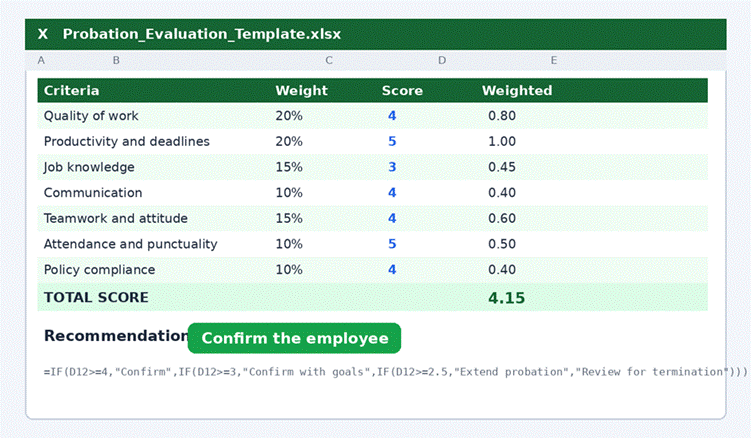
Excel Probation Evaluation Template: How It Works
The Excel version saves time and avoids calculation mistakes.
- Enter the employee details at the top.
- Type the score (1 to 5) in the Score column.
- The weighted score is calculated with a formula such as =C5*B5.
- The total is calculated with =SUM(D5:D11).
- The recommendation cell uses a formula such as the one below.
=IF(D12>=4,”Confirm”,IF(D12>=3,”Confirm with goals”,IF(D12>=2.5,”Extend probation”,”Review for termination”)))
You can change the weights and the decision limits to fit your company.
Free Download
Download the template:
Template is free to use, edit and print for personal and company use. Please do not resell.
Common Mistakes to Avoid
- Waiting until the last day. Feedback must be given during probation, not only at the end.
- Rating on personality. Judge work and behavior, not whether you like the person.
- Giving only numbers. Always add comments with examples.
- Skipping the employee’s voice. A one-way review feels like a verdict.
- Ignoring policy and law. Probation rules, notice periods and termination procedures differ by country. Check your local labor law.
- Forgetting the paperwork. An unsigned or unfiled form is a weak record.
Tips for a Fair and Kind Evaluation
- Be specific, honest and respectful.
- Praise real achievements, even small ones.
- If the answer is “extend” or “no”, explain why clearly and calmly.
- Remember that behind every form is a person who may be anxious about their income and future.
Frequently Asked Questions
How long should a probation period be?
Commonly 3 months, but it can range from 1 to 6 months depending on the company and local law.
Can probation be extended?
Yes, if your contract and local law allow it. Give a written reason, clear goals and a new end date.
Should the employee see the evaluation?
Yes. Sharing it builds trust and helps the employee improve.
Is a probation evaluation form legally required?
Not always, but it is strongly recommended as proof of a fair process. Check the labor law of your country.
Can I edit the template?
Yes. Change the criteria, weights and rating scale to match your role and company culture.
Conclusion
A probation evaluation form turns a stressful decision into a fair, simple and documented process. Use clear criteria, give feedback early, listen to the employee and record the final decision properly. Download the free Word and Excel templates above and start using them today.
If this guide helped you, share it with a colleague in HR, and tell us in the comments how your company handles probation reviews.
Disclaimer: This article and the templates are for general guidance only and are not legal advice. Employment laws differ by country, so check your local labor law or consult a legal professional.

About Muhammad Faisal
Muhammad Faisal is an HR professional with an MBA in Human Resources and six years of experience across diverse HR domains. Through HRGuide.site, he turns real-world HR knowledge into practical insights, career advice, interview tips, and valuable resources to help professionals grow and organizations thrive.