Employment Application Form: A Complete Step-by-Step Guide to Filling It Out Correctly
By HR Guide · Reading time: 8 minutes · Updated October 2026
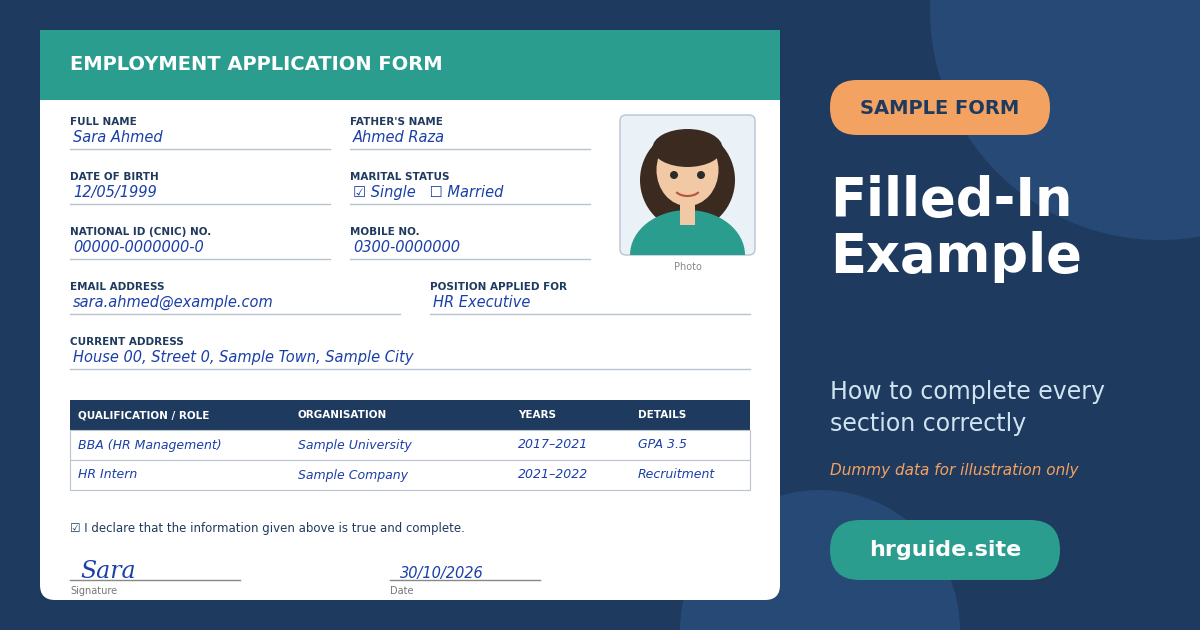
Employment application form step-by-step guide (original illustration, free to use)
Walking into a new job starts with one Strong piece of paper: the employment application form. It looks simple and Professional, yet small errors such as a wrong date, a blank field or a mismatched name can delay your joining or even cost you the offer. HR teams read hundreds of forms, and a clean, complete form tells them something important before the interview even begins: this person is careful and reliable.
In this guide you will learn what an employment form is, why employers use it, how to complete every section step by step, the mistakes to avoid, and how to use our free blank template. The template contains no company name, no logo and no personal data, so you can use it for any organisation.
In this guide: what the form is · six-step walkthrough · documents checklist · common mistakes · tips for HR teams · FAQs
What Is an Employment Application Form?
An employment application form is a standard document that a candidate completes to give an organisation structured information about their identity, education, work history, skills and references. Unlike a CV, which every candidate designs differently, the form asks everyone the same questions in the same order. That makes it easy for HR to compare candidates fairly, keep consistent records, and verify facts later.
Most forms also serve as a legal record. The signed declaration at the end confirms that the details are true, which is why accuracy matters so much.
I made this form for new talent with no experience with application forms; it’s essential because the first impression is the last, so I made it step by step, with complete guidance and a free download template.
Why Employers Still Use It
- Fair comparison: every candidate answers identical questions.
- Complete records: addresses, emergency contacts, and identity numbers are collected once, in one place.
- Verification: HR can check employees, degrees, and references against what you wrote.
- Compliance: it supports payroll, insurance and employee-file requirements.
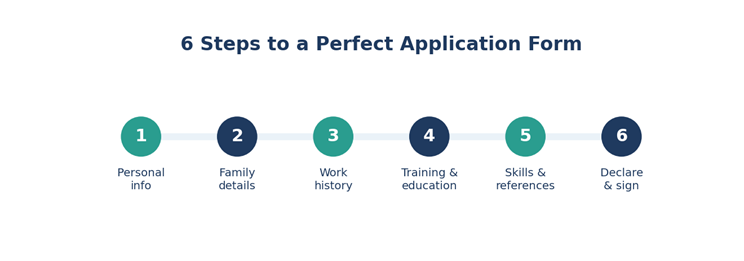
The six steps of completing an employment form (original illustration, free to use)
Step-by-Step: How to Fill In Each Section
Step 1: Personal Information
Write your full name exactly as it appears on your national ID card, because payroll and legal documents will use that spelling. Add your father’s or husband’s name if the form asks, your date of birth in the requested format (usually DD/MM/YYYY), blood group, passport number and expiry date if you hold one, and your marital status.
Give a mobile number you answer daily and an email address that looks professional. Provide both a current and a permanent address; if they are the same, write the full address twice rather than “same as above” so nothing is misread. Finally, list an emergency contact with their relationship to you.
Tip: Keep your ID card in front of you while writing numbers. A single swapped digit is the most common reason forms are returned.
Because when I filled out my first application form, it was filled out with the wrong account number by just one digit, and my first month’s salary was sent to someone else’s account and it could not be recovered, so that’s why its important to keep every document and before filling the form verify the data.
Step 2: Dependent Family Members
This section is used for benefits such as medical insurance. List the name, date of birth and relation of each dependent, for example spouse, child or parent. If you have none, write “None” instead of leaving the table empty, so HR knows it was not skipped.
Step 3: Employment History
List jobs from the most recent to the oldest. For each one, give the organisation name, a contact number, your job title, the start and end month and year, and an honest reason for leaving. Internships and part-time work count, so include them if they are relevant. If you have a gap between jobs, a short truthful note such as “completed a certification course” is far better than silence.
Also add the name and contact number of your previous manager. Let that person know in advance that they may receive a call.
Step 4: Training and Education
Under training, list courses, workshops and online certificates with the title, duration, institution and date. Under education, start with your latest qualification and work backwards: institution, degree, city, grade or GPA, years attended and major subjects. Write institution names in full and check the spelling, since HR may verify them with the board or university.
Step 5: Skills and References
Rate your computer and language skills honestly as beginner, intermediate or proficient. Overstating a skill is risky because you may be tested on it. Choose references who know your work, such as a former supervisor, teacher or senior colleague, and include their designation, company and phone number. Always ask permission before listing anyone.
Step 6: General Questions, Documents and Declaration
Answer the general questions truthfully. If asked whether you know someone in the organisation, give their name and designation. If a question concerns legal history and your answer is yes, attach the requested explanation rather than leaving it blank. Then tick the documents you are attaching, read the declaration carefully, and sign with the same signature you use on your ID card.
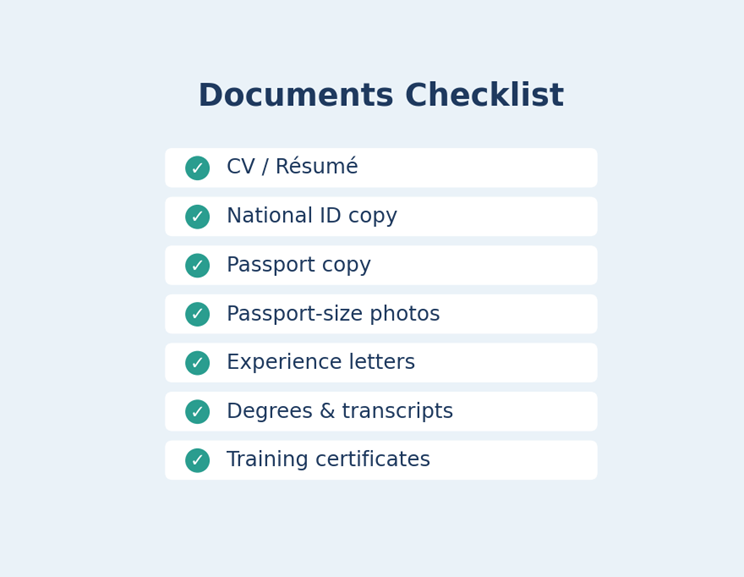
Documents to attach with your employment form (original illustration, free to use)
Documents Checklist
Prepare photocopies before you sit down to write. Typical requirements are:
- Updated CV or résumé
- Copy of national ID card
- Copy of passport, if applicable
- Recent passport-size photographs
- Experience letters from previous employers
- Academic degrees and transcripts
- Training and course certificates
Keep the originals with you for verification, and submit only copies unless asked otherwise.
10 Common Mistakes to Avoid
- Leaving fields blank instead of writing “N/A” or “None”.
- Spelling your name differently from your ID.
- Writing dates in inconsistent formats.
- Giving an inactive phone number or an unprofessional email address.
- Listing references without asking them.
- Exaggerating skills or job titles.
- Skipping employment gaps without explanation.
- Using correction fluid or heavy overwriting.
- Forgetting the photograph or signature.
- Not keeping a copy of the submitted form for your records.
Tips for HR Teams: Designing a Better Form
A good form is short enough to finish in fifteen minutes and clear enough to need no explanation. Group related questions under numbered headings, leave generous writing space, use consistent fonts and add a checklist of required documents at the end. Collect only information you genuinely need, store it securely, and tell candidates how it will be used. Our redesigned template follows these principles with a clean layout, shaded labels and tick boxes.
A note on privacy: never publish a filled-in form online. It contains identity numbers and contact details that can be misused. When sharing a form publicly, always use a blank template and leave out your employer’s name and branding unless you have written permission.
Free Employment Form Template
The blank template that accompanies this article is original, contains no organisation name or personal information, and may be downloaded, edited, printed and shared freely. Replace the “Organisation” line with your own company details before use. It is formatted for A4 paper and fits on three pages.
Free Employment Form Template
Frequently Asked Questions
Is an employment form the same as a CV?
No. A CV is a free-format summary of your career that you design yourself. An employment form is a standardised document created by the employer, and it usually becomes part of your official personnel file.
Can I fill the form in by hand?
Yes, unless the employer asks for a typed version. Use blue or black ink and block letters so every word is readable.
What if I make a mistake?
Draw a single neat line through it and write the correct entry beside it, then initial the change. For a major error, ask for a fresh form.
What happens if I give false information?
Most declarations state that false or misleading details can lead to rejection or dismissal. Honesty protects your reputation and your job.
Do I need to attach everything on the checklist?
Attach what applies to you. If an item does not apply, such as a passport you do not hold, tick “No” rather than leaving it blank.
Final Thoughts
The employment application form is your first impression in writing. Gather your documents, write carefully, be honest and review everything before you sign. A few extra minutes of attention can make the difference between a smooth start and an avoidable delay. Use the free template, follow the six steps above, and you will submit a form that HR can process with confidence.
Disclaimer: this article is for general information only. Requirements vary by country and employer, so always follow the instructions of the organisation you are applying to.

About Muhammad Faisal
Muhammad Faisal is an HR professional with an MBA in Human Resources and six years of experience across diverse HR domains. Through HRGuide.site, he turns real-world HR knowledge into practical insights, career advice, interview tips, and valuable resources to help professionals grow and organizations thrive.